
UKG Pro
UKG, Inc.Business
4.17.66K Reviews
- Version
- 5.08.04.0921
- Installs
- 5.00M
- Age Rating
- Everyone
Screenshots
Our Review of UKG Pro
 Analysis by Appyee
For anyone whose employer uses UKG’s workplace systems, UKG Pro is meant to put everyday HR tasks within reach on a phone. I find that idea useful when a shift, a time-off request, or a benefits question comes up away from a desk. It is a business app from UKG, Inc., and its value depends less on being a universal HR tool than on whether your workplace has set it up for you.
What free access means in practice
UKG Pro is free to download, so there is no purchase price to weigh against its convenience. That makes trying it a low-cost decision, but it does not mean the app can replace an employer’s HR system or give every employee access to every function. Your organization’s setup determines what you can use. I would check with your HR team or manager before relying on it for a task that has a deadline.
The app has a 4.3 average from around 69,000 ratings, and it has been installed over a million times. Those figures suggest broad use, but they cannot tell me whether it will work smoothly with a particular employer’s configuration. I’d treat the app as a practical companion to a workplace account, not a standalone service to sign up for independently.
Using UKG Pro for everyday work
It is listed for Everyone and runs on Android 8.0 or later. The current version is 5.02.00.0680, and it was released on October 2, 2023. UKG Pro is available on Android and iOS, which is handy for teams using different phones. Before installing, I’d still make sure your device meets the operating-system requirement and that your employer uses UKG Pro.
Getting started with your employer’s setup
The first practical question is not how to browse the app, but how your workplace expects you to sign in. An employee who has never used the organization’s UKG system may need instructions from HR or a manager before the mobile app is useful. I would get the correct access details first, then check that the profile and workplace information shown after login look right.
That small check can save frustration later. For example, if you plan to use the app to review a shift or submit a request, make sure you are looking at the account connected to your current workplace. If something appears missing, I would ask the employer’s HR contact whether the feature is enabled for your role rather than assuming the phone app is broken.
Keeping time and schedule tasks together
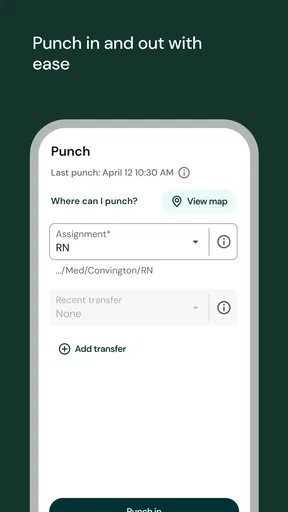
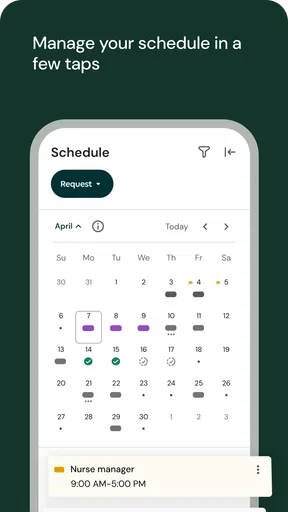
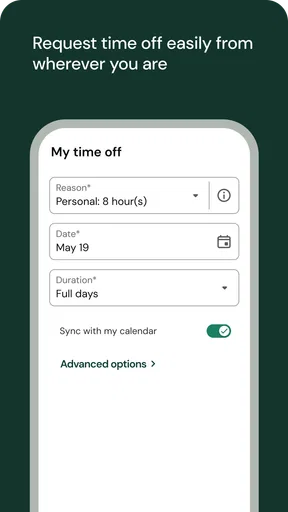
When enabled by an employer, time tools can bring clocking in or out, schedule checks, and time-off requests into one place. That is most useful when the information is needed at the moment of action: checking a shift before leaving home, for instance, or submitting a request as soon as you know which dates you need. It can reduce the back-and-forth of searching through email or asking someone to resend a schedule.
I would still treat the app as a convenient view of work information, not as a reason to stop keeping track of important details. If a schedule change affects childcare, transport, or another commitment, confirm the relevant dates and times before making plans. For a time-sensitive clock-in or request, it is sensible to check that the action has gone through instead of assuming a tap completed it.
Benefits information on a small screen
Having benefits information accessible on a phone can make routine questions easier to handle. I can see the appeal of checking a summary while comparing options or looking up coverage without waiting until I am back at a computer. For a more involved decision, though, I would take the time to read the details carefully and contact HR if any term or choice is unclear. A compact mobile view is convenient, but it is not a substitute for understanding what a benefit covers.
A useful habit is to open the relevant section before you actually need it. That gives you time to learn where the information sits and whether your employer has made the function available. It is also a better moment to notice an account or access issue than when you are trying to make a decision quickly.
Messages and notifications without constant checking
Work messages and alerts can make the app a useful place to catch updates alongside HR tasks. Push notifications may help when a schedule or workplace message needs attention, but I would be selective about relying on them as the only way to hear important news. Phone settings, quiet hours, and a busy day can all affect what you notice. If missing a change would cause a problem, check the app directly or follow the communication routine your employer uses.
Keeping work notifications on the same phone as personal alerts can also become noisy. I’d review notification settings and decide which updates are genuinely useful to receive immediately. That is a more comfortable way to use a work app than allowing every alert to interrupt the day.
What it does better than the usual alternatives
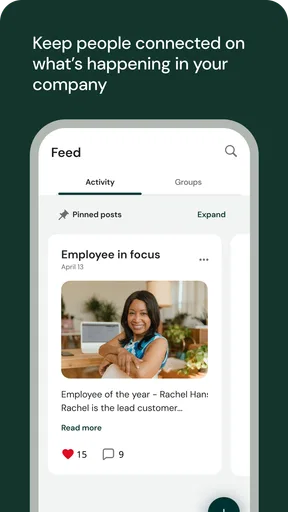
Compared with checking separate emails, paper notices, and HR web pages, a mobile workplace app can make recurring tasks easier to find in one place. UKG Pro’s appeal is strongest when an employer already uses it for employee information, schedules, time, or benefits. In that situation, it can be more direct than searching a crowded inbox or keeping a bookmark to a desktop portal.
It is not automatically better than every alternative. A company intranet may be the right place for general policies, while a manager or HR representative is still the better source for a complicated or urgent question. And if your employer relies on a different HR platform, installing UKG Pro will not make it the right tool for your workplace. The key distinction is that this app supports an organization’s UKG setup; it is not a general-purpose payroll or benefits account for anyone to use.
Where the convenience has limits
The biggest trade-off is that usefulness depends on the employer’s configuration and the employee’s access. Someone may install the app and still find that a particular task is unavailable or that they need guidance to sign in. That can be disappointing if you expected a self-contained service. I would set expectations accordingly: the app is a mobile route into workplace tools, and the organization decides which tools are relevant to its employees.
A phone is also not always the best place to review detailed information or make a careful choice. Small screens are fine for quick checks, but less comfortable for comparing benefit details or reading a long policy. If a task involves a significant decision, I’d use a larger screen when available and ask HR about anything that remains uncertain.
There is a practical distinction between convenience and recordkeeping, too. A mobile app can help you submit or view a work item, but I would not assume that seeing a button or notification guarantees that a request has been approved. For time off or a schedule change, check the status and follow up through the employer’s normal process if the outcome affects your plans.
A realistic shift-day routine
Imagine starting a workday by checking the schedule before leaving home, then using the time tool when you arrive. Later, you remember that you need a day off and send a request while the dates are fresh in your mind. If your employer has enabled those options, the phone can save a trip to a computer and keep the basic steps close at hand. Before arranging anything around the request, you would still check its status rather than treating submission as approval.
That workflow is where I see the clearest value: a few short actions spread across a normal workday, rather than trying to manage every part of employment from a phone. It is especially convenient for employees who do not spend their shifts at a desk. Someone who rarely needs HR information may see much less benefit and may prefer to use the employer’s existing web portal only when necessary.
Who is likely to get the most from it?
I’d recommend giving it a try if your workplace already uses UKG Pro and you regularly need to check schedules, handle time-related tasks, review benefits, or keep up with work messages. It can be particularly useful for employees who move around during the day and cannot easily open a computer whenever a small HR task comes up.
Managers and HR staff may also find a mobile point of access useful, but I would not assume that every administrative task can or should be handled on a phone. The best fit is someone whose employer has enabled the relevant functions and whose needs are mostly quick checks or straightforward actions. For detailed policy work or complicated account questions, a full web experience or direct help from HR may be more appropriate.
I would skip it, at least for now, if your organization does not use UKG Pro or has not provided access instructions. I’d also avoid depending on it as your only source for urgent work updates until you know how your employer handles notifications and approvals. If you simply want an independent way to manage personal finances or compare insurance, this is not the kind of app to install for that purpose.
My verdict on the value
For a free app, UKG Pro can be worthwhile when it connects you to tasks your employer already manages through UKG. The benefit is not that it replaces every workplace channel, but that common employee actions can be easier to reach when you are away from a desk. I like that practical role, with the caveat that access and available features depend on the organization.
UKG Pro is a solid choice for employees who know their workplace uses it and want a mobile way to stay on top of routine HR matters. It is less compelling as a download without an employer account, and a computer or direct HR contact remains a better choice for complex questions. If you have workplace access, I’d install it, confirm what your employer has enabled, and use it for quick tasks while keeping an eye on request status and important details.
Alright folks, let’s dive into the world of UKG Pro, a nifty app designed to make managing human resources a breeze. If you’re like me, juggling work schedules, payroll, and benefits can get a little overwhelming. So, when I got my hands on UKG Pro, I was curious to see if it could simplify this chaos. Spoiler alert: it does a pretty decent job!
Getting Started with Ease
First things first, downloading and setting up the app was a piece of cake. It’s available on both Android and iOS, so no worries about compatibility here. Once installed, the user interface greets you with a clean, intuitive design. I’ve used my fair share of clunky HR apps, and let me tell you, this one is refreshingly straightforward. The icons are clear, the navigation is smooth, and everything is where you’d expect it to be.
Logging in for the first time, I appreciated the step-by-step guide that helps you get acquainted with the app. It’s like having a mini tour guide walk you through the features without the hassle of figuring out what each button does. Kudos to the developers for this!
Features That Stand Out
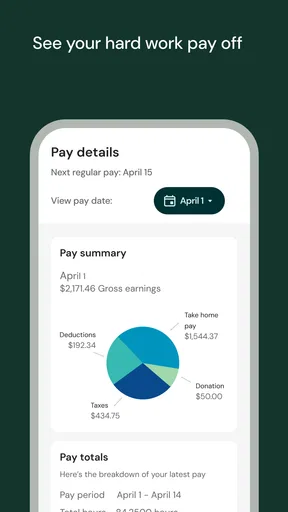
Now, onto the goodies. The app is packed with features that cater to both employees and HR professionals. From managing payroll to accessing personal benefits information, everything is just a tap away. For someone who loves having all my work-related info in one spot, this is a dream come true.
One of the standout features is the time management tool. It allows you to clock in and out, request time off, and view your schedule effortlessly. No more fumbling through emails or paperwork to find out when your next shift is. Just a quick glance at the app, and you’re set. As a person who values time efficiency, this feature alone makes the app worth a try.
Another feature that caught my eye is the benefits management section. You can view your benefits summary, track your coverage, and even make adjustments when needed. It’s like having an HR department in your pocket. And let’s be real, who doesn’t want that?
Communication Made Simple
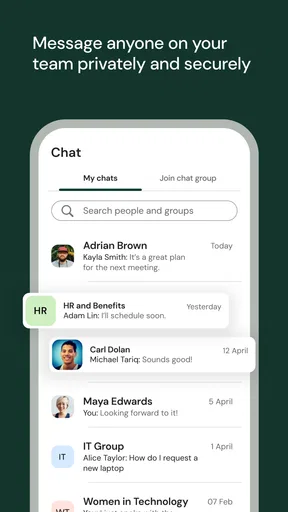
Communication can often be a bottleneck in workplaces, but UKG Pro addresses this with its messaging feature. You can easily communicate with your team or HR without having to switch between apps or platforms. It’s a seamless way to ensure everyone is on the same page, which is crucial, especially in larger organizations.
Additionally, the app allows for push notifications, so you’ll never miss an important update or message. Whether it's a change in schedule or a reminder for an upcoming meeting, you’ll be in the loop without having to constantly check your email.
User Experience
Let’s talk about user experience, shall we? Overall, the app runs smoothly with minimal glitches. The loading times are quick, and I didn’t experience any crashes during my time using it. This is a big win, as there’s nothing more frustrating than an app that decides to freeze up right when you need it most.
The app is also visually appealing, with a modern design that doesn’t overwhelm the senses. The color scheme is easy on the eyes, making it pleasant to use for extended periods. Plus, the app is regularly updated, ensuring it runs efficiently and securely.
My Final Thoughts
In wrapping up, UKG Pro is a solid choice for anyone looking to streamline their HR tasks. Whether you’re an employee wanting easy access to payroll and benefits, or an HR professional managing a bustling office, this app has got you covered. It’s user-friendly, feature-rich, and designed to make your life a little bit easier.
So, if you’re tired of the usual HR headaches, give UKG Pro a whirl. It might just be the solution you’ve been searching for to keep everything organized and at your fingertips. Happy managing!
Privacy and Permissions
See what permissions an app requests and how it handles your data.
- Identity
- find accounts on the device
- Calendar
- read calendar events plus confidential information, add or modify calendar events and send email to guests without owners' knowledge
- Contacts
- find accounts on the device, read your contacts, modify your contacts
- Location
- approximate location (network-based), precise location (GPS and network-based)
- Phone
- read phone status and identity
- Photos/Media/Files
- read the contents of your USB storage, modify or delete the contents of your USB storage
- Storage
- read the contents of your USB storage, modify or delete the contents of your USB storage
- Camera
- take pictures and videos
- Microphone
- record audio
- Wi-Fi connection information
- view Wi-Fi connections
- Device ID & call information
- read phone status and identity
- Other
- view network connections, pair with Bluetooth devices, change network connectivity, connect and disconnect from Wi-Fi, control flashlight, full network access, run at startup, reorder running apps, control vibration, prevent device from sleeping, Google Play license check
Verdict
Strengths of UKG Pro
- User-friendly interface for easy navigation.
- Comprehensive HR and payroll features.
- Customizable dashboards for personalized use.
- Seamless integration with third-party apps.
- Strong data security and privacy protocols.
Limitations of UKG Pro
- Occasional slow performance during peak times.
- Limited offline functionality.
- Initial setup can be time-consuming.
- Some features require additional costs.
- Customer support response times can vary.
Other Releases by UKG, Inc.
View All


Similar Picks in This Category
View All
LinkedIn: Community & Network
LinkedIn3.8

Zoom Workplace
zoom.com4.1

Microsoft Teams
Microsoft Corporation4.6

Meta Business Suite
Meta Platforms, Inc.4.6

Webex Meetings
Cisco Systems, Inc.4.5

TeamViewer Remote Control
TeamViewer4.4
Frequently Asked Questions
What is UKG Pro and what are its primary features?
UKG Pro is a comprehensive human capital management (HCM) solution designed for businesses to manage HR, payroll, and talent management. Key features include employee self-service, payroll processing, benefits administration, talent acquisition, and performance management. It provides a user-friendly interface and valuable analytics to improve workforce efficiency and engagement.
Is UKG Pro available on both Android and iOS?
Yes, UKG Pro is available on both Android and iOS platforms. Users can download the app from the Google Play Store or the Apple App Store. The mobile application allows employees and managers to access essential HR features, like clocking in and out, viewing pay statements, and managing personal information, directly from their devices.
How secure is my data when using UKG Pro?
UKG Pro places a high priority on data security and privacy. The platform uses advanced encryption methods to protect sensitive information. It complies with industry standards and regulations, including GDPR and CCPA, ensuring that user data is handled securely. Regular audits and updates help maintain a robust security posture.
Can UKG Pro integrate with other business applications?
Yes, UKG Pro offers seamless integration capabilities with numerous third-party business applications. It supports APIs and connectors that allow integration with software for accounting, learning management, and more. This flexibility helps businesses streamline operations by ensuring data consistency across different platforms.
What kind of support does UKG Pro offer to its users?
UKG Pro provides extensive support options to assist users. This includes 24/7 customer service, an online knowledge base, and community forums. Users can also access training resources and webinars to better understand the platform's features. Dedicated account managers are also available to provide personalized assistance for business-specific needs.
